PlantPAx
Distributed Control System
PlantPAx
Distributed Control System

About
PlantPAx is an industrial automation system that empowers producers to make informed decisions, enhance efficiency, and adapt quickly to changing demands.
My task
I focused on enhancing process control, data visualization, and performance monitoring for system diagnostics health. My efforts were aimed at enabling faster decision-making and significantly improving operational efficiency.
Team
Collaborated with a team of 20+ professionals, including developers, UX designers, and project managers.
Timeline
October 2023 – March 2024
Role
Research & UX/UI Design
About
PlantPAx is an industrial automation system that empowers producers to make informed decisions, enhance efficiency, and adapt quickly to changing demands.
My task
I focused on enhancing process control, data visualization, and performance monitoring for system diagnostics health. My efforts were aimed at enabling faster decision-making and significantly improving operational efficiency.
Team
Collaborated with a team of 20+ professionals, including developers, UX designers, and project managers.
Timeline
October 2023 – March 2024
Role
Research & UX/UI Design
Challenge

Reducing Cognitive Load
Reducing Cognitive Load
The existing interfaces were complex and time-consuming, leading to inefficiencies and potential errors.
Complex Interfaces: The existing interfaces were complex and time-consuming.
Potential Errors: The intricate design increased the likelihood of potential errors.
Inefficiencies: This complexity led to inefficiencies in completing tasks.
Complex Interfaces: The existing interfaces were complex and time-consuming.
Potential Errors: The intricate design increased the likelihood of potential errors.
Inefficiencies: This complexity led to inefficiencies in completing tasks.
Reducing Cognitive Load
FactoryTalk
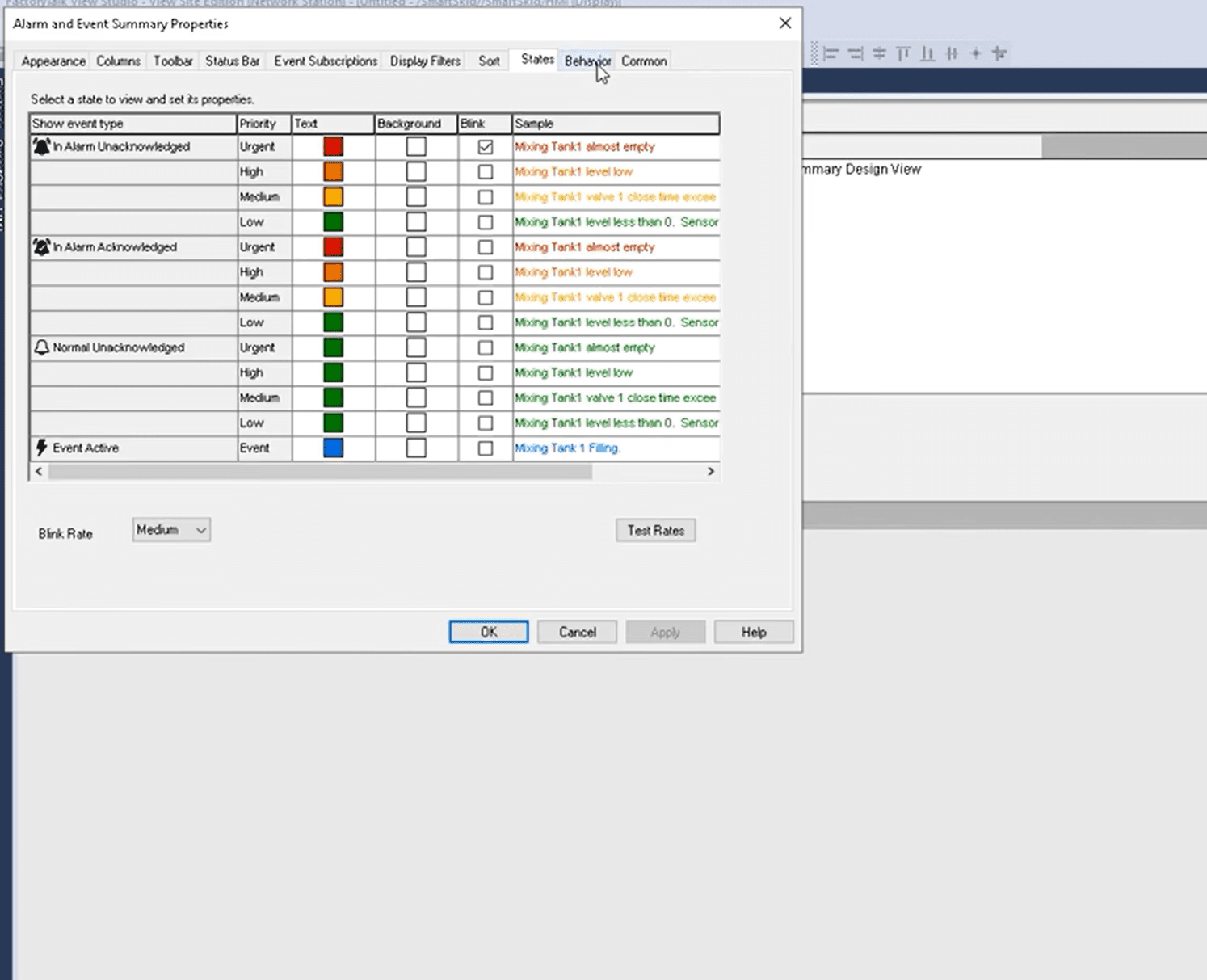
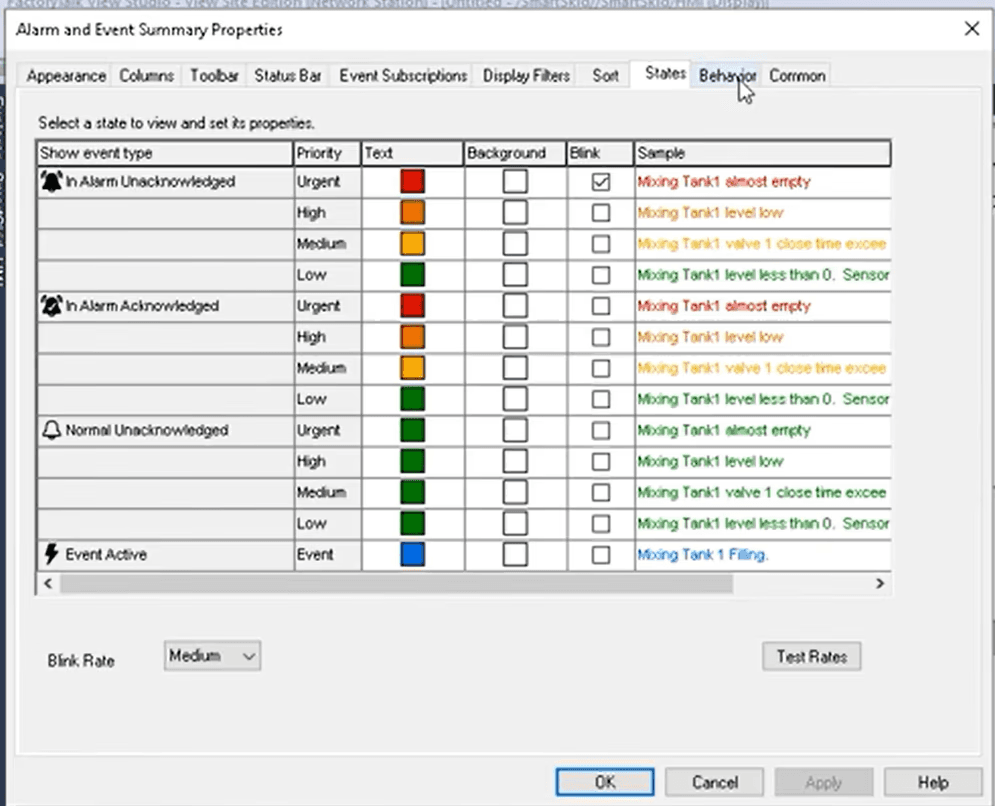
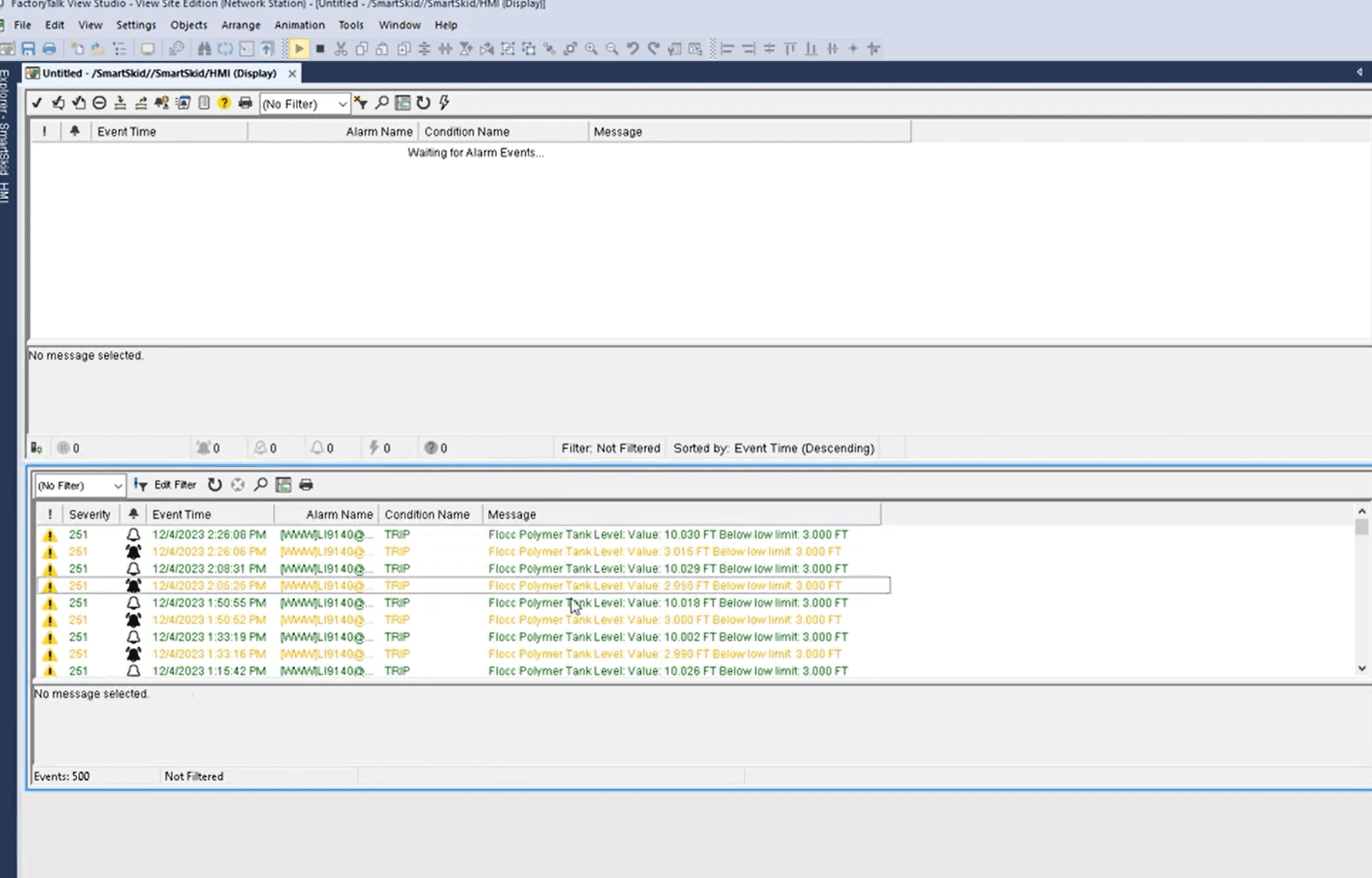
While FactoryTalk workflow for Alarms & Events provides comprehensive monitoring,
but operators need a more efficient way to track system diagnostics and maintain plant health in real-time.
FactoryTalk
While FactoryTalk workflow for Alarms & Events provides comprehensive monitoring,
but operators need a more efficient way to track system diagnostics and maintain plant health in real-time.
Key Challenge

We needed to add a System Diagnostics feature to PlantPAx.
We needed to add a System Diagnostics feature to PlantPAx.
Our diagnostic UI had to integrate seamlessly with existing systems to retrieve real-time alarms, visualize performance data, and provide recommendations.
Our diagnostic UI had to integrate seamlessly with existing systems to retrieve real-time alarms, visualize performance data, and provide recommendations.
Key Challenge
Key Challenge
Our diagnostic UI had to integrate seamlessly with existing systems to retrieve real-time alarms, visualize performance data, and provide recommendations.
Challenge
Challenge
Process
Understanding the System Complexity
Understanding the System Complexity
Recognizing that complex and time-consuming interfaces were causing inefficiencies and potential errors, our strategy focused on reducing cognitive load for users.
To effectively design the System Diagnostics experience, I first needed to understand how the current system operates, what data is available, and where improvements are needed.
Recognizing that complex and time-consuming interfaces were causing inefficiencies and potential errors, our strategy focused on reducing cognitive load for users.
To effectively design the System Diagnostics experience:
I gathered qualitative data from user feedback, and system study sessions with Rockwell PlantPAx. Using Dovetail, I identified patterns and common pain points in user interactions with system diagnostics.
System Operation: I first needed to understand how the current system operates.
Data Availability: Identify what data is available.
Areas for Improvement: Determine where improvements are needed.
My Key Questions
01
Where Data Comes From?


By studying PlantPAx documentation and meeting with automation experts, I learned that system diagnostics rely on PLCs, sensors, and FactoryTalk software. These components collect real-time machine data and process it for operators
02
What Problems Exist in the Current System?


Through hands-on research and discussions with system engineers, I discovered that FactoryTalk logs alarms but doesn’t provide an integrated fix. Operators must manually switch between different tools, increasing troubleshooting time.
03
What’s Missing for a Better User Experience?


After analyzing workflows and consulting with FactoryTalk users, I identified a key need: a centralized dashboard that connects all diagnostics into one clear interface. This would streamline troubleshooting and reduce system downtime.
Data Flow Overview
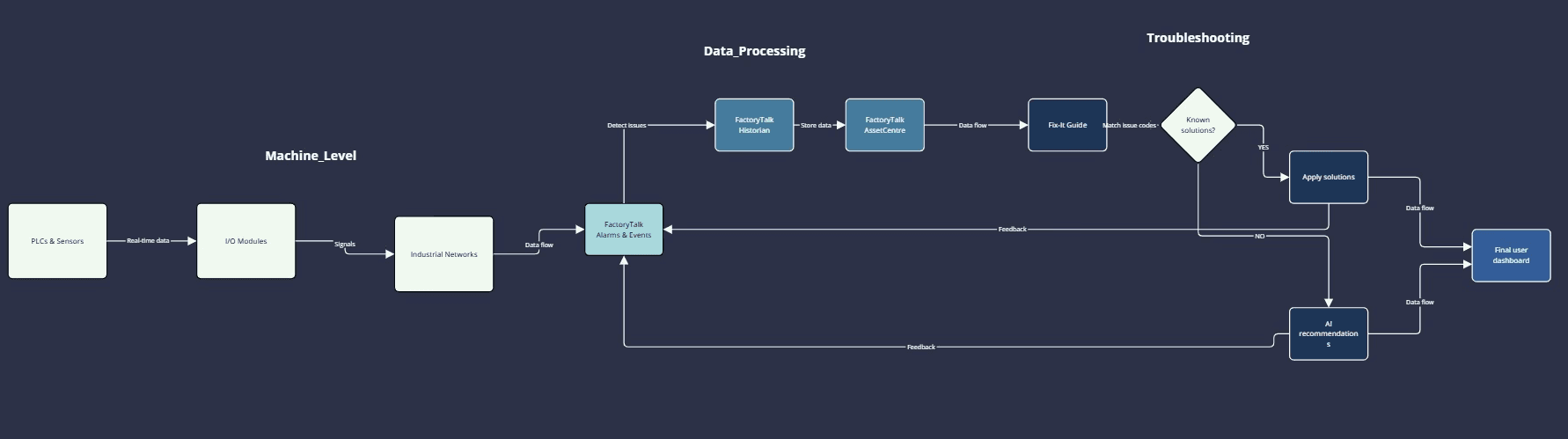
This flowchart illustrates how data moves through the system, from PLCs and sensors to FactoryTalk, Fix-It Guide, and finally into our application for a seamless diagnostic experience.
01
Where Data Comes From?
By studying PlantPAx documentation and meeting with automation experts, I learned that system diagnostics rely on PLCs, sensors, and FactoryTalk software. These components collect real-time machine data and process it for operators
02
What Problems Exist in the Current System?
Through hands-on research and discussions with system engineers, I discovered that FactoryTalk logs alarms but doesn’t provide an integrated fix. Operators must manually switch between different tools, increasing troubleshooting time.
03
What’s Missing for a Better User Experience?
After analyzing workflows and consulting with FactoryTalk users, I identified a key need: a centralized dashboard that connects all diagnostics into one clear interface. This would streamline troubleshooting and reduce system downtime.
Data Flow Overview
This flowchart illustrates how data moves through the system, from PLCs and sensors to FactoryTalk, Fix-It Guide, and finally into our application for a seamless diagnostic experience.
01
Where Data Comes From?
By studying PlantPAx documentation and meeting with automation experts, I learned that system diagnostics rely on PLCs, sensors, and FactoryTalk software. These components collect real-time machine data and process it for operators
02
What Problems Exist in the Current System?
Through hands-on research and discussions with system engineers, I discovered that FactoryTalk logs alarms but doesn’t provide an integrated fix. Operators must manually switch between different tools, increasing troubleshooting time.
03
What’s Missing for a Better User Experience?
After analyzing workflows and consulting with FactoryTalk users, I identified a key need: a centralized dashboard that connects all diagnostics into one clear interface. This would streamline troubleshooting and reduce system downtime.
Data Flow Overview
This flowchart illustrates how data moves through the system, from PLCs and sensors to FactoryTalk, Fix-It Guide, and finally into our application for a seamless diagnostic experience.
01
Where Data Comes From?
By studying PlantPAx documentation and meeting with automation experts, I learned that system diagnostics rely on PLCs, sensors, and FactoryTalk software. These components collect real-time machine data and process it for operators
02
What Problems Exist in the Current System?
Through hands-on research and discussions with system engineers, I discovered that FactoryTalk logs alarms but doesn’t provide an integrated fix. Operators must manually switch between different tools, increasing troubleshooting time.
03
What’s Missing for a Better User Experience?
After analyzing workflows and consulting with FactoryTalk users, I identified a key need: a centralized dashboard that connects all diagnostics into one clear interface. This would streamline troubleshooting and reduce system downtime.
Data Flow Overview
This flowchart illustrates how data moves through the system, from PLCs and sensors to FactoryTalk, Fix-It Guide, and finally into our application for a seamless diagnostic experience.
01
Where Data Comes From?
By studying PlantPAx documentation and meeting with automation experts, I learned that system diagnostics rely on PLCs, sensors, and FactoryTalk software. These components collect real-time machine data and process it for operators
02
What Problems Exist in the Current System?
Through hands-on research and discussions with system engineers, I discovered that FactoryTalk logs alarms but doesn’t provide an integrated fix. Operators must manually switch between different tools, increasing troubleshooting time.
03
What’s Missing for a Better User Experience?
After analyzing workflows and consulting with FactoryTalk users, I identified a key need: a centralized dashboard that connects all diagnostics into one clear interface. This would streamline troubleshooting and reduce system downtime.
Data Flow Overview
This flowchart illustrates how data moves through the system, from PLCs and sensors to FactoryTalk, Fix-It Guide, and finally into our application for a seamless diagnostic experience.
01
Where Data Comes From?
By studying PlantPAx documentation and meeting with automation experts, I learned that system diagnostics rely on PLCs, sensors, and FactoryTalk software. These components collect real-time machine data and process it for operators
02
What Problems Exist in the Current System?
Through hands-on research and discussions with system engineers, I discovered that FactoryTalk logs alarms but doesn’t provide an integrated fix. Operators must manually switch between different tools, increasing troubleshooting time.
03
What’s Missing for a Better User Experience?
After analyzing workflows and consulting with FactoryTalk users, I identified a key need: a centralized dashboard that connects all diagnostics into one clear interface. This would streamline troubleshooting and reduce system downtime.
Data Flow Overview
This flowchart illustrates how data moves through the system, from PLCs and sensors to FactoryTalk, Fix-It Guide, and finally into our application for a seamless diagnostic experience.
01
Where Data Comes From?
By studying PlantPAx documentation and meeting with automation experts, I learned that system diagnostics rely on PLCs, sensors, and FactoryTalk software. These components collect real-time machine data and process it for operators
02
What Problems Exist in the Current System?
Through hands-on research and discussions with system engineers, I discovered that FactoryTalk logs alarms but doesn’t provide an integrated fix. Operators must manually switch between different tools, increasing troubleshooting time.
03
What’s Missing for a Better User Experience?
After analyzing workflows and consulting with FactoryTalk users, I identified a key need: a centralized dashboard that connects all diagnostics into one clear interface. This would streamline troubleshooting and reduce system downtime.
Data Flow Overview
This flowchart illustrates how data moves through the system, from PLCs and sensors to FactoryTalk, Fix-It Guide, and finally into our application for a seamless diagnostic experience.
01
Where Data Comes From?
By studying PlantPAx documentation and meeting with automation experts, I learned that system diagnostics rely on PLCs, sensors, and FactoryTalk software. These components collect real-time machine data and process it for operators
02
What Problems Exist in the Current System?
Through hands-on research and discussions with system engineers, I discovered that FactoryTalk logs alarms but doesn’t provide an integrated fix. Operators must manually switch between different tools, increasing troubleshooting time.
03
What’s Missing for a Better User Experience?
After analyzing workflows and consulting with FactoryTalk users, I identified a key need: a centralized dashboard that connects all diagnostics into one clear interface. This would streamline troubleshooting and reduce system downtime.
Data Flow Overview
This flowchart illustrates how data moves through the system, from PLCs and sensors to FactoryTalk, Fix-It Guide, and finally into our application for a seamless diagnostic experience.
I gathered qualitative data from user feedback, and system study sessions with Rockwell PlantPAx. Using Dovetail, I identified patterns and common pain points in user interactions with system diagnostics.
Key Takeaways
1
Operators are familiar with the Industrial automation system interface and existing control systems.
Operators are familiar with the complex Industrial automation system interface and existing control systems.
2
Operators prioritize system alarms over other tasks during critical situations.
Operators prioritize system alarms over other tasks during critical situations.
3
Most operators prefer minimal interaction with the system unless prompted by alarms.
Most operators prefer minimal interaction with the system unless prompted by alarms.
4
Complex system designs may be limiting operators' efficiency rather than supporting it.
Complex system designs may be limiting operators' efficiency rather than supporting it.
Creating a user-centered design that meets the real needs of operators and engineers.
Creating a user-centered design that meets the real needs of operators and engineers.
When an alarm goes off, I don’t have time to dig through multiple screens—I need to see exactly what’s wrong, right away.
When an alarm goes off, I don’t have time to dig through multiple screens—I need to see exactly what’s wrong, right away.

Mark Jensen
Maintenance Operator
35
New York
Technical diploma
Maintenance Operator, Oil & Gas Industry
Description
Mark works in high-pressure environments where downtime is costly. He’s highly experienced but finds current systems inefficient and overwhelming due to data overload and system complexity. Mark needs a simple and intuitive dashboard to improve his efficiency.
Goals
Minimize downtime by quickly identifying and resolving issues in real-time.
Ensure system reliability by performing preventive and corrective maintenance.
Navigate system alerts efficiently and handle critical alarms in high-pressure environments.
Needs from PlantPAX
A simple and intuitive dashboard that prioritizes critical alarms and provides real-time diagnostics.
Predictive maintenance features that notify of potential equipment failures before they occur.
Mobile access for on-the-go maintenance, allowing real-time monitoring even when away from the control room.
“I need clear data insights to identify process inefficiencies, but navigating complex layers of information slows me down.”
“I need clear data insights to identify process inefficiencies, but navigating complex layers of information slows me down.”

Sarah Martinez
Process Engineer
42
San Francisco
Bachelor's Degree in Chemical Engineering, Master's Degree in Process Engineering
Process Engineer, Pharmaceutical Industry
Description
Sara's career in the pharmaceutical industry centers on optimizing manufacturing processes for efficiency, compliance, and scalability. She collaborates with production teams and management to meet industry standards and regulatory requirements. Her expertise includes designing processes that achieve production targets while reducing waste, improving quality, and minimizing energy consumption.
Goals
Optimize operational efficiency by analyzing data trends to reduce costs and improve system performance.
Ensure regulatory compliance by maintaining accurate records and process documentation.
Collaborate with operators to refine processes based on real-time data and operator feedback.
Pain Points
Complex system configurations that take too much time to navigate when trying to make improvements.
Lack of real-time data analysis tools that provide insights into process efficiency without manual data extraction.
Difficulty collaborating with operators due to separate interfaces for engineering and operations, leading to miscommunication.
When an alarm goes off, I don’t have time to dig through multiple screens—I need to see exactly what’s wrong, right away.
Mark Jensen
Maintenance Operator
35
New York
Technical diploma
Maintenance Operator, Oil & Gas Industry
Description
Mark works in high-pressure environments where downtime is costly. He’s highly experienced but finds current systems inefficient and overwhelming due to data overload and system complexity. Mark needs a simple and intuitive dashboard to improve his efficiency.
Goals
Minimize downtime by quickly identifying and resolving issues in real-time.
Ensure system reliability by performing preventive and corrective maintenance.
Navigate system alerts efficiently and handle critical alarms in high-pressure environments.
Needs from PlantPAX
A simple and intuitive dashboard that prioritizes critical alarms and provides real-time diagnostics.
Predictive maintenance features that notify of potential equipment failures before they occur.
Mobile access for on-the-go maintenance, allowing real-time monitoring even when away from the control room.
I need clear data insights to identify process inefficiencies, but navigating complex layers of information slows me down.
Sarah Martinez
Process Engineer
42
San Francisco
Bachelor's Degree in Chemical Engineering, Master's Degree in Process Engineering
Process Engineer, Pharmaceutical Industry
Description
Sara's career in the pharmaceutical industry centers on optimizing manufacturing processes for efficiency, compliance, and scalability. She collaborates with production teams and management to meet industry standards and regulatory requirements. Her expertise includes designing processes that achieve production targets while reducing waste, improving quality, and minimizing energy consumption.
Goals
Optimize operational efficiency by analyzing data trends to reduce costs and improve system performance.
Ensure regulatory compliance by maintaining accurate records and process documentation.
Collaborate with operators to refine processes based on real-time data and operator feedback.
Pain Points
Complex system configurations that take too much time to navigate when trying to make improvements.
Lack of real-time data analysis tools that provide insights into process efficiency without manual data extraction.
Difficulty collaborating with operators due to separate interfaces for engineering and operations, leading to miscommunication.
User Story
User Story
User Story


As a senior maintenance operator in a fast-paced oil & gas environment, I need a system that prioritizes critical alarms and provides real-time insights into system performance, so I can respond quickly to minimize downtime and ensure safety.
Maintenance Operator - Mark Jensen
Maintenance Operator - Mark Jensen
As a process engineer in the pharmaceutical industry, I need a system that offers clear data insights and trends, so I can optimize processes, reduce waste, and maintain compliance with industry regulations.
Process Engineer - Sara Martinez
Process Engineer - Sara Martinez
Problem Statement
Problem Statement
Problem Statement
Mark needs a system that simplifies alarm prioritization and provides actionable diagnostics, as the current system overloads him with data, making it difficult to quickly respond to critical issues in real-time.
Maintenance Operator - Mark Jensen
Maintenance Operator
Mark Jensen
Sara needs a system that provides easy access to performance metrics and real-time data, as navigating complex data layers in the current system slows her down when making critical decisions.
Process Engineer - Sara Martinez
Process Engineer
Sara Martinez
At this stage, we defined the core features for system diagnostic's MVP, based on a deep understanding of the operators' and engineers' challenges in managing complex industrial processes.
At this stage, we defined the core features for system diagnostic's MVP, based on a deep understanding of the operators' and engineers' challenges in managing complex industrial processes.
MVP Priority List
MVP Priority List
1
Minimize manual efforts by automating reports, logs, and performance analysis to help engineers make data-driven decisions.
Minimize manual efforts by automating reports, logs, and performance analysis to help engineers make data-driven decisions.
2
Streamline user experience by designing a clean, efficient, and easy-to-navigate interface for process monitoring and control.
Streamline user experience by designing a clean, efficient, and easy-to-navigate interface for process monitoring and control.
3
Enable operators to quickly identify and troubleshoot system inefficiencies by providing real-time diagnostics, alarms, and anomaly detection.
Enable operators to quickly identify and troubleshoot system inefficiencies by providing real-time diagnostics, alarms, and anomaly detection.
Process
Process
Design
Design

Crafting the Solution
Crafting the Solution
Crafting the Solution
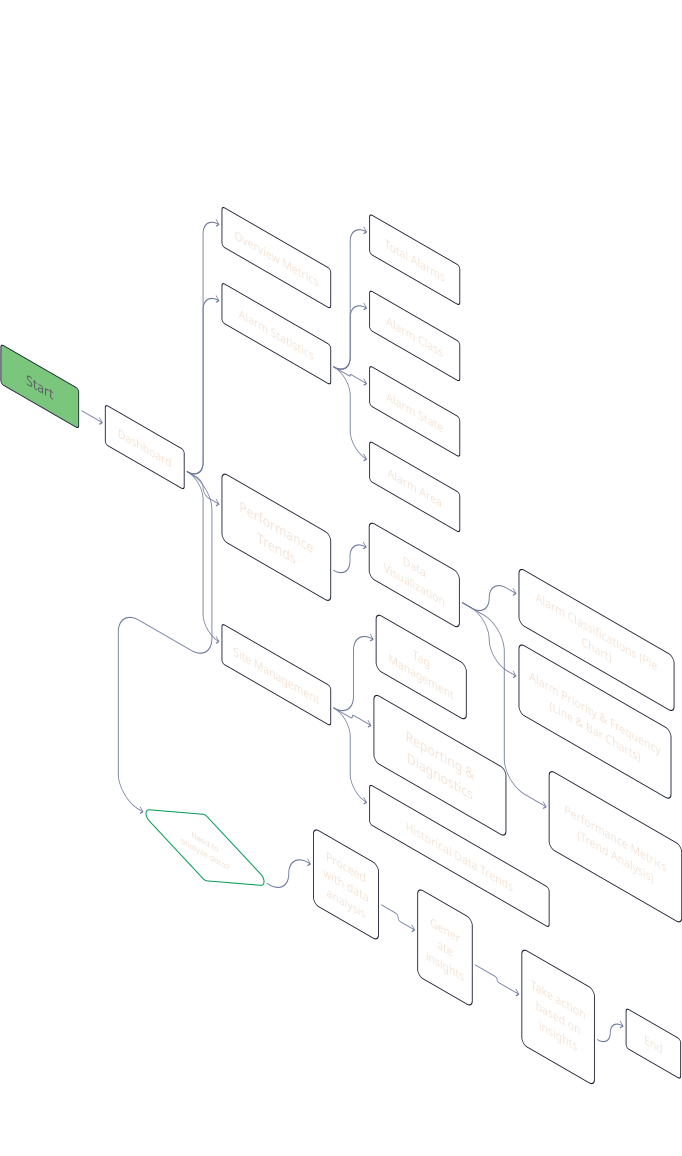
To simplify the interface and improve usability, I reduced unnecessary elements and logically organized information. Understanding how FactoryTalk handles alarms, analyzing user feedback, and engaging with stakeholders helped me create an Information Architecture that provides a clear overview of the system diagnostics.
To simplify the interface and improve usability, I reduced unnecessary elements and logically organized information. Understanding how FactoryTalk handles alarms, analyzing user feedback, and engaging with stakeholders helped me create an Information Architecture that provides a clear overview of the system diagnostics.
To simplify the interface and improve usability, I reduced unnecessary elements and logically organized information. Understanding how FactoryTalk handles alarms, analyzing user feedback, and engaging with stakeholders helped me create an Information Architecture that provides a clear overview of the system diagnostics.
UI Design Guidelines
UI Design Guidelines
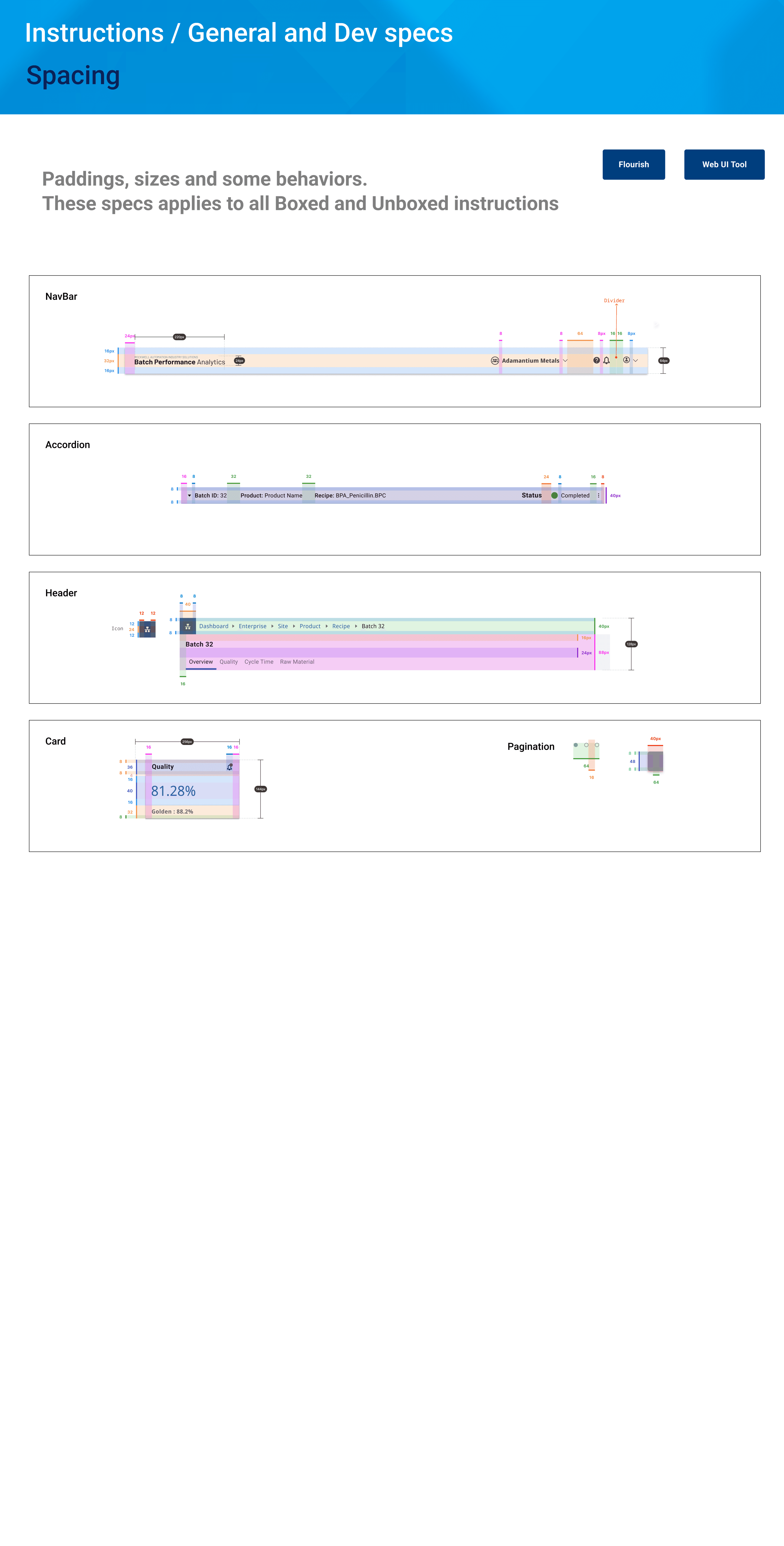
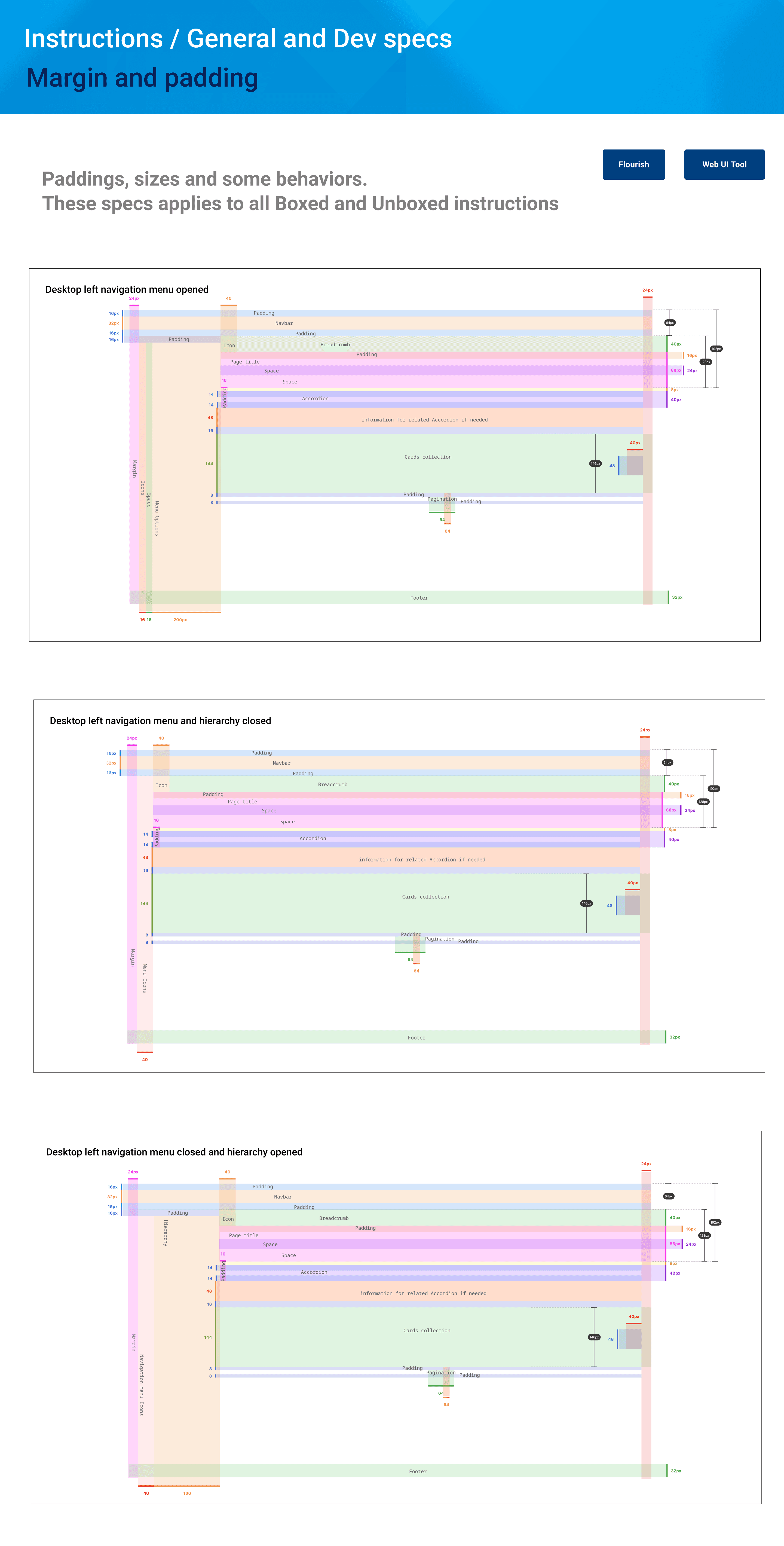
To ensure a consistent and pixel-perfect implementation, I created comprehensive UI design guidelines. This section outlines the key spacing and margin specifications that were essential for maintaining visual harmony and alignment across the project.
To ensure a consistent and pixel-perfect implementation, I created comprehensive UI design guidelines. This section outlines the key spacing and margin specifications that were essential for maintaining visual harmony and alignment across the project.
Throughout the design process, I:
Throughout the design process, I:
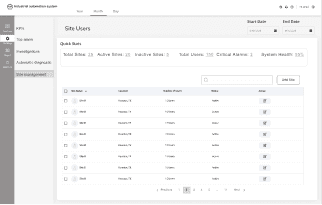
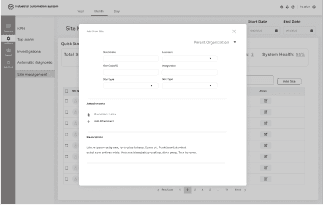
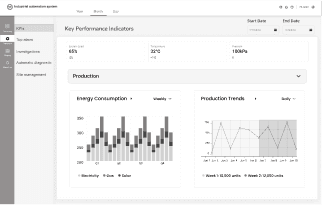
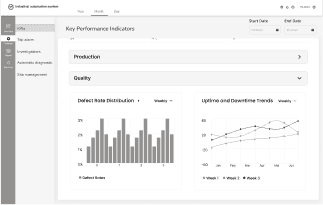
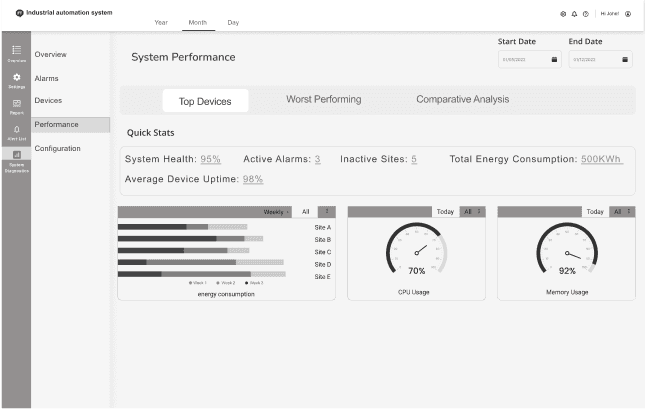
Shared mid-fidelity designs during each review session because I believe active prototypes yield more realistic feedback.
Collaborated closely with the technical team and business stakeholders, ensuring that the design was both feasible and aligned with business goals.
Shared mid-fidelity designs during each review session because I believe active prototypes yield more realistic feedback.
Mid-Stage Designs
Mid-Stage Designs
Final Deliverables
After
After
Before
After
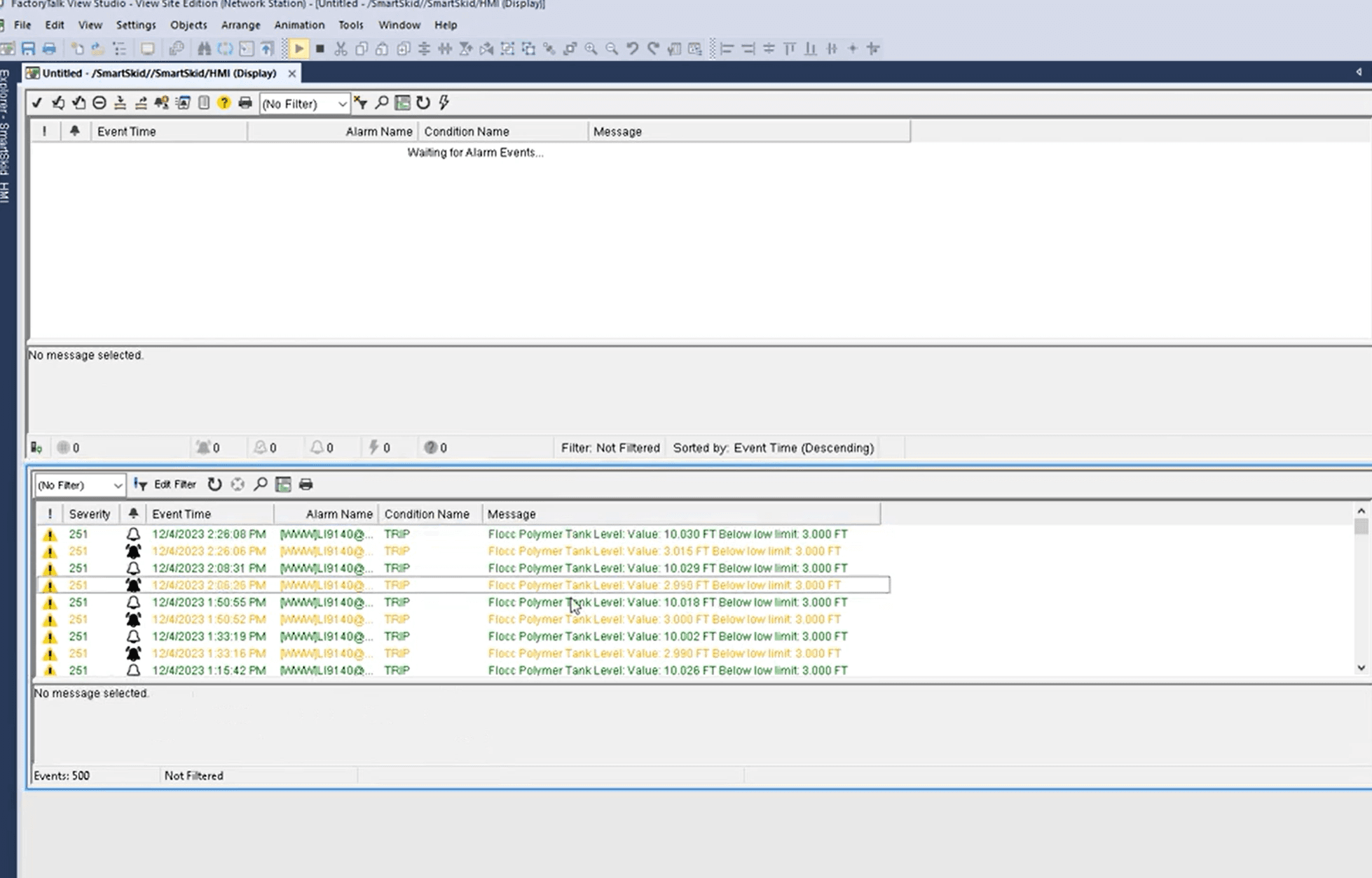
Before
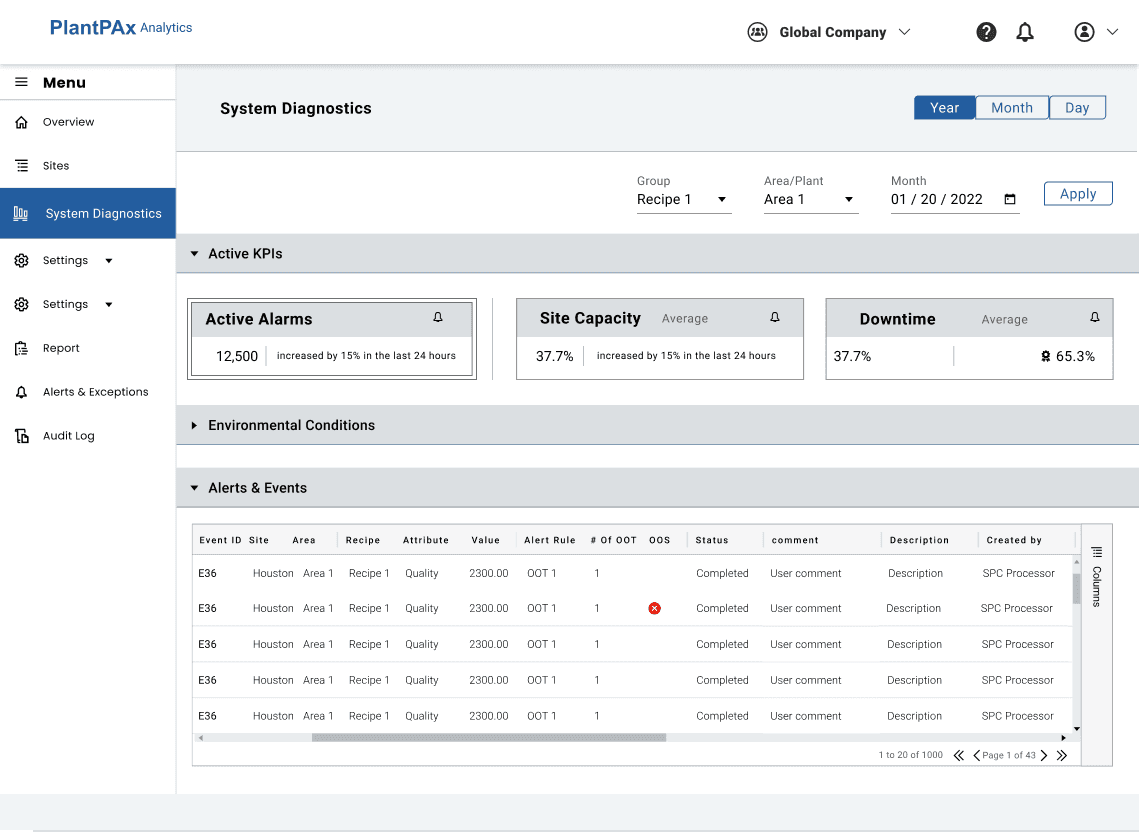
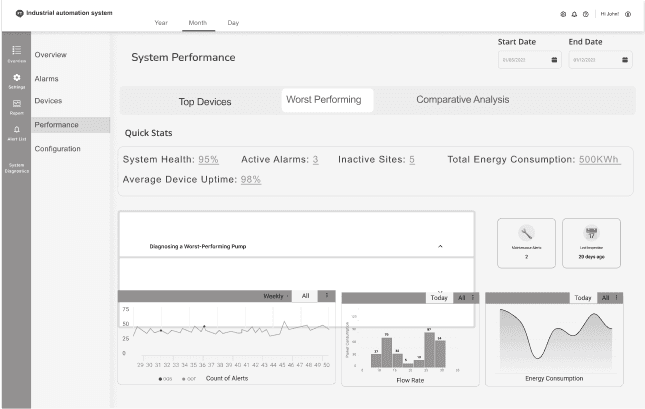
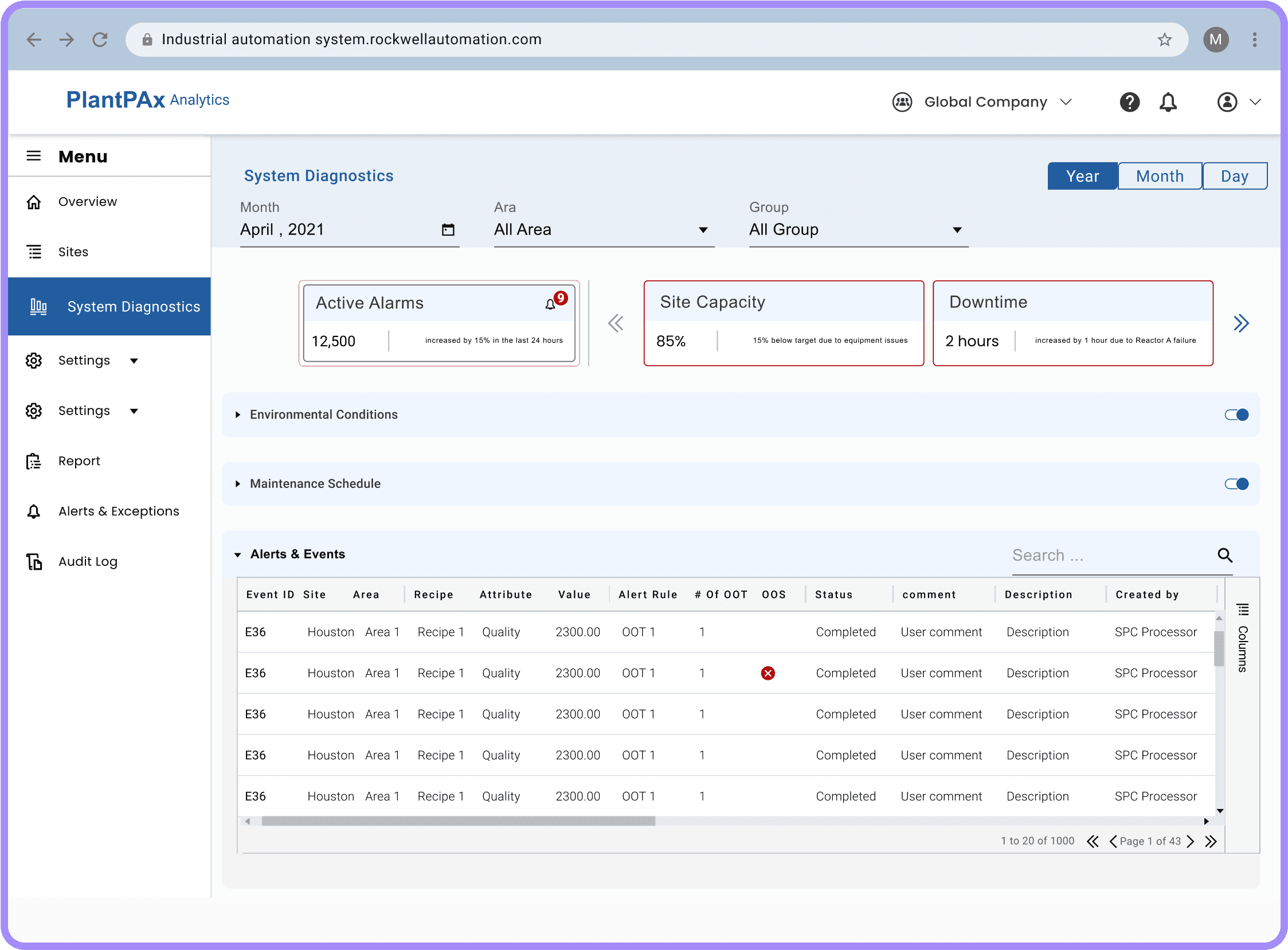
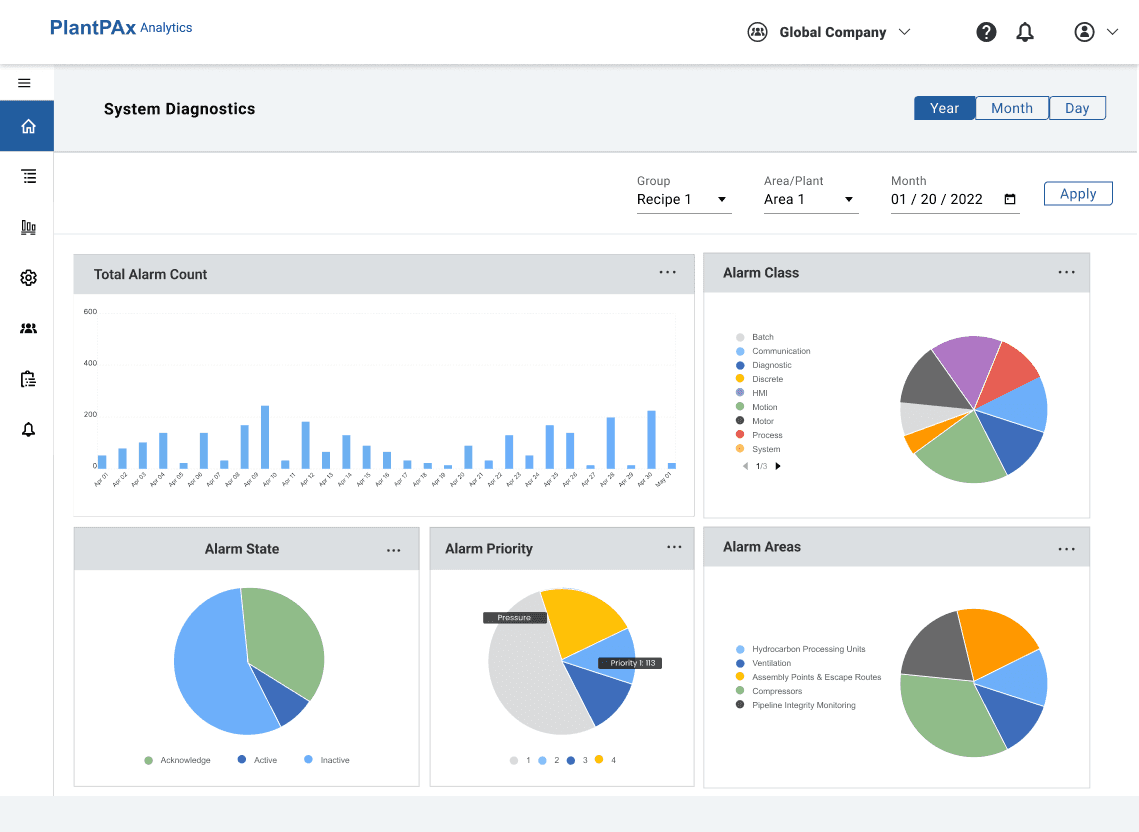
The side navigation now has an expandable "System Diagnostics" menu, which includes detailed "System Health" and "Alarms and Events" options. This allows users to directly access comprehensive diagnostics and view alarms and events in detail for each piece of equipment at the enterprise level.
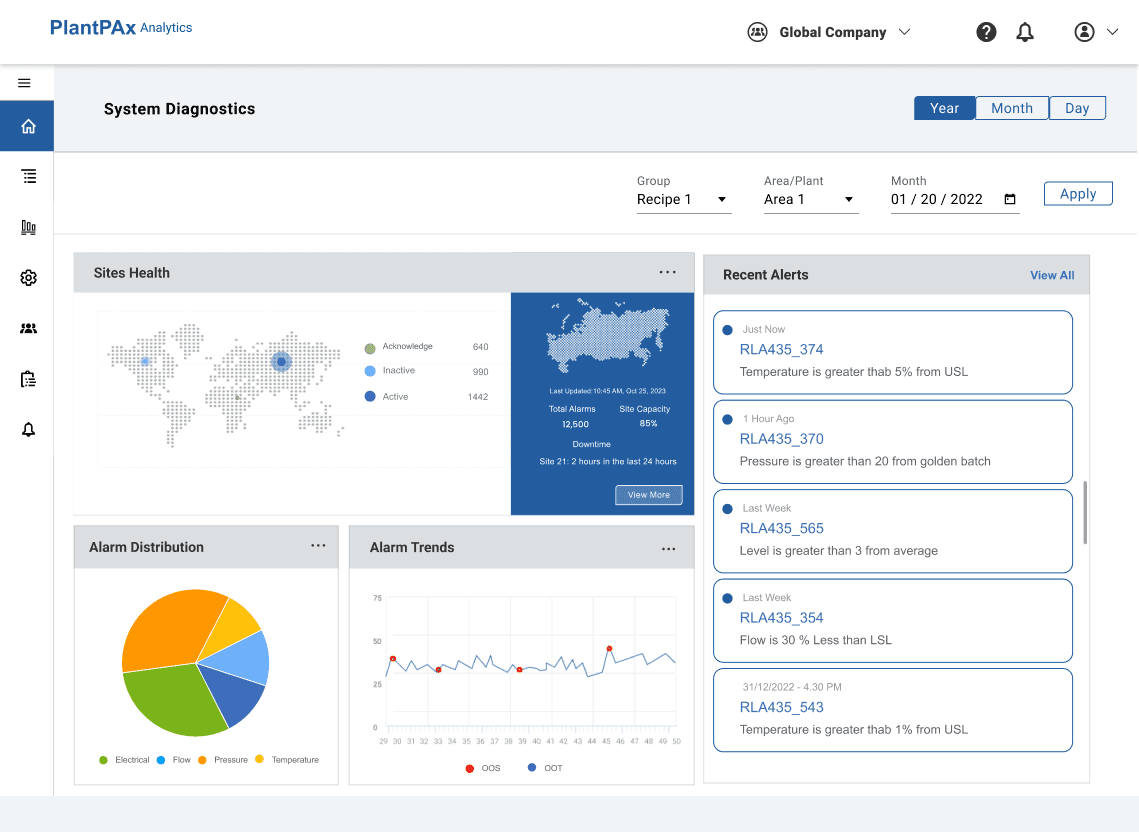
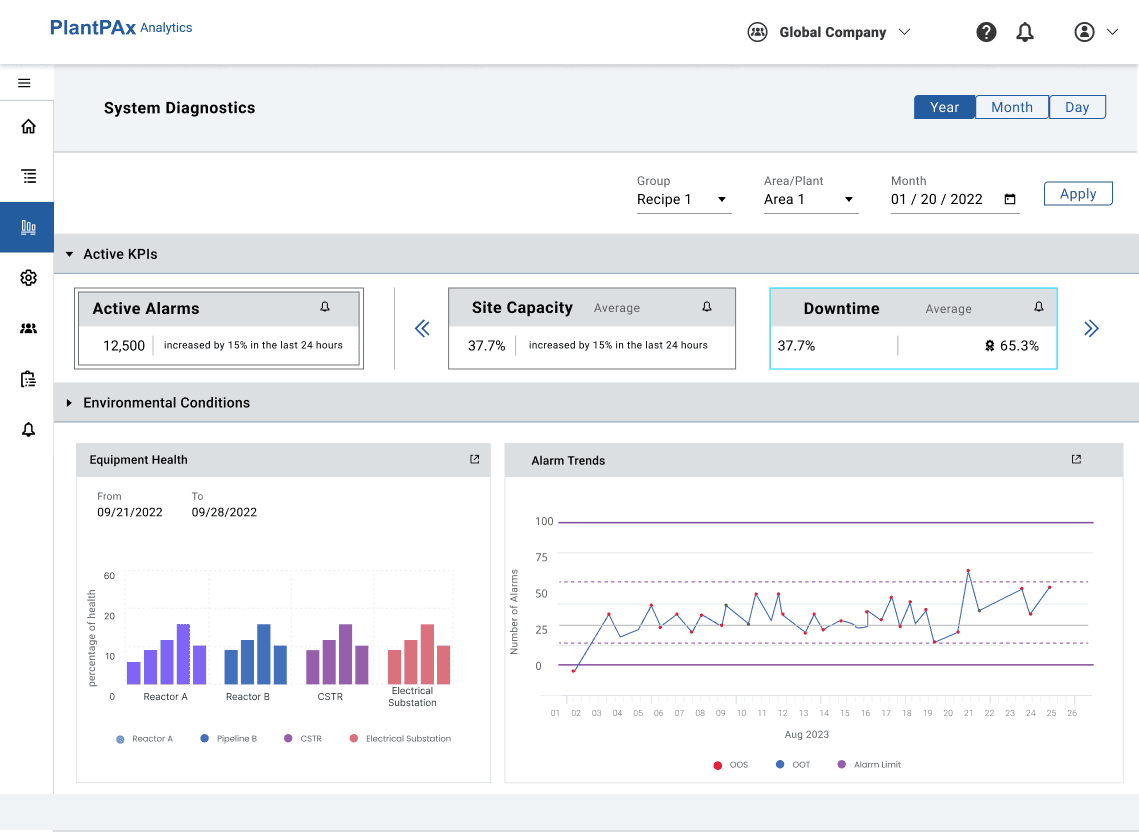
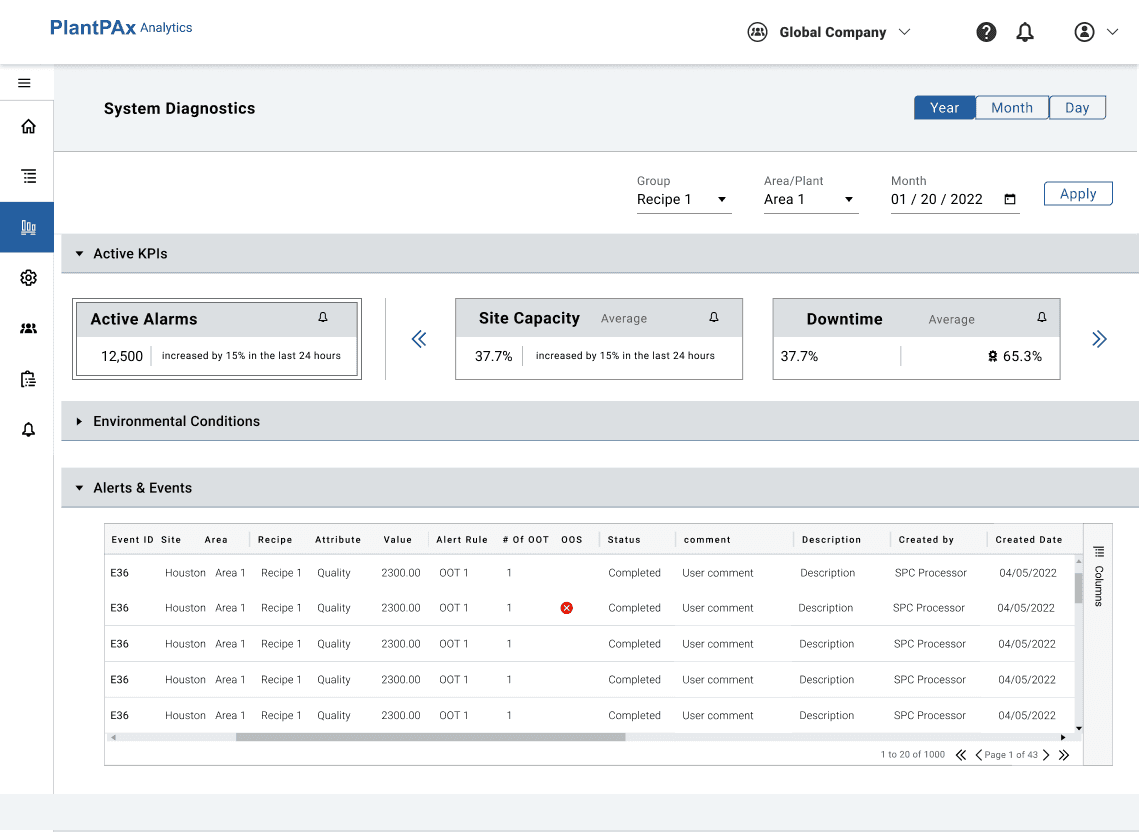
A fixed "Active Alarms" card offers immediate visibility into critical issues. Adjacent to it are scrollable cards focusing on system diagnostics, displaying important information such as site capacity, downtime, and more. This arrangement allows users to quickly assess key performance indicators and efficiently monitor system health, all within a streamlined interface.
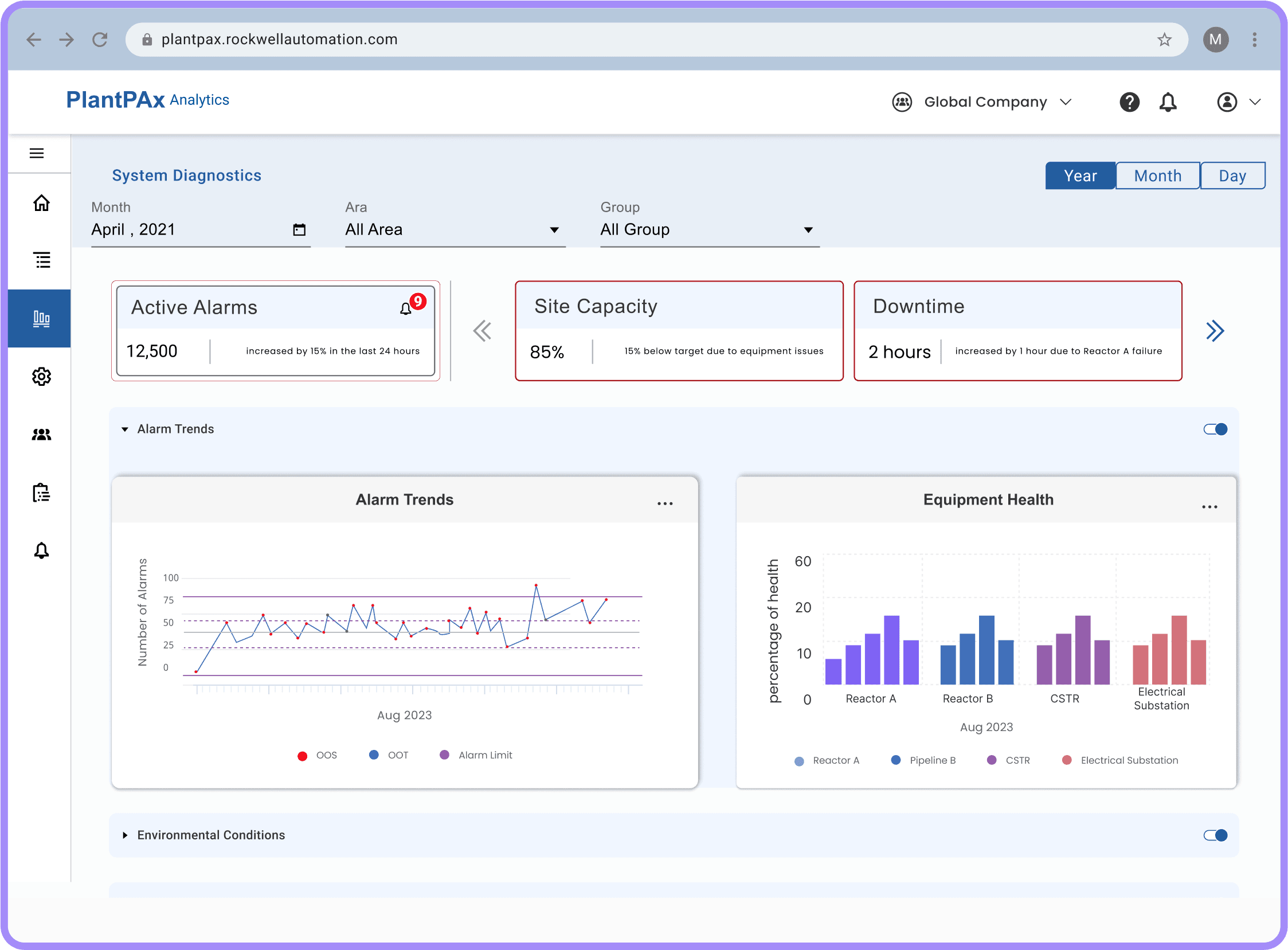
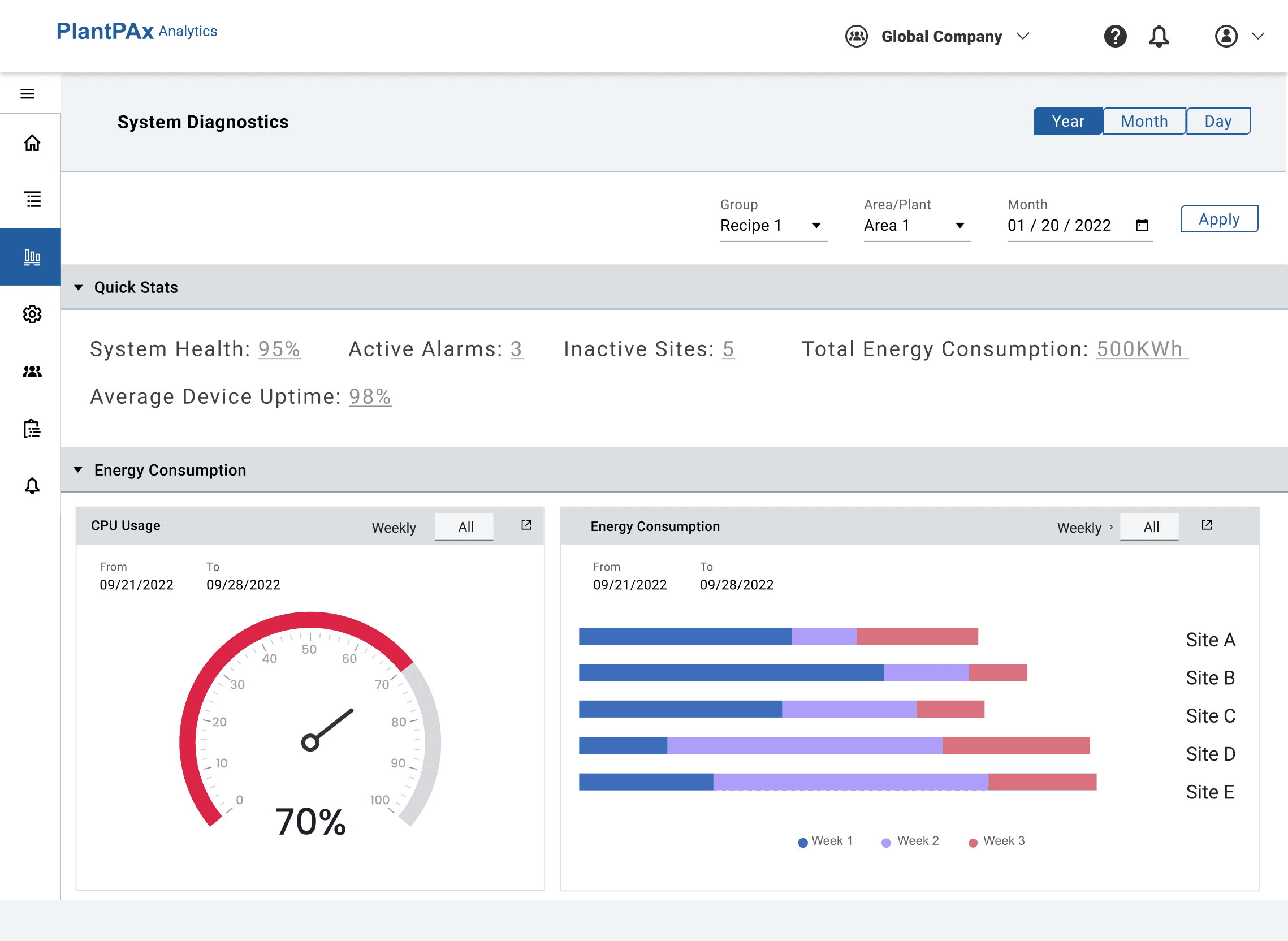
The overview page now features horizontal accordions that provide detailed system health information without requiring navigation to different pages. This design allows users to expand sections for in-depth insights while keeping the interface clean and accessible.
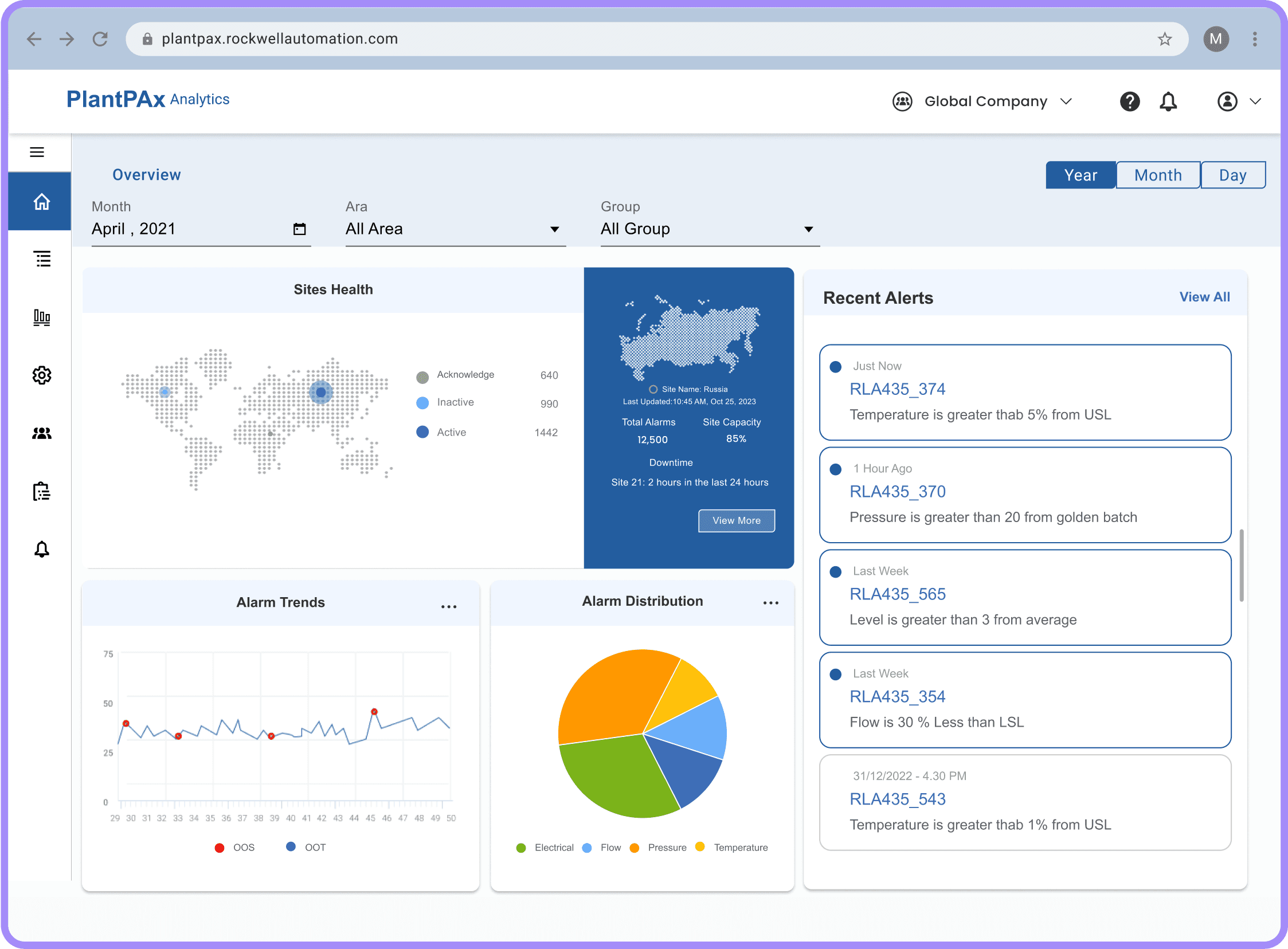
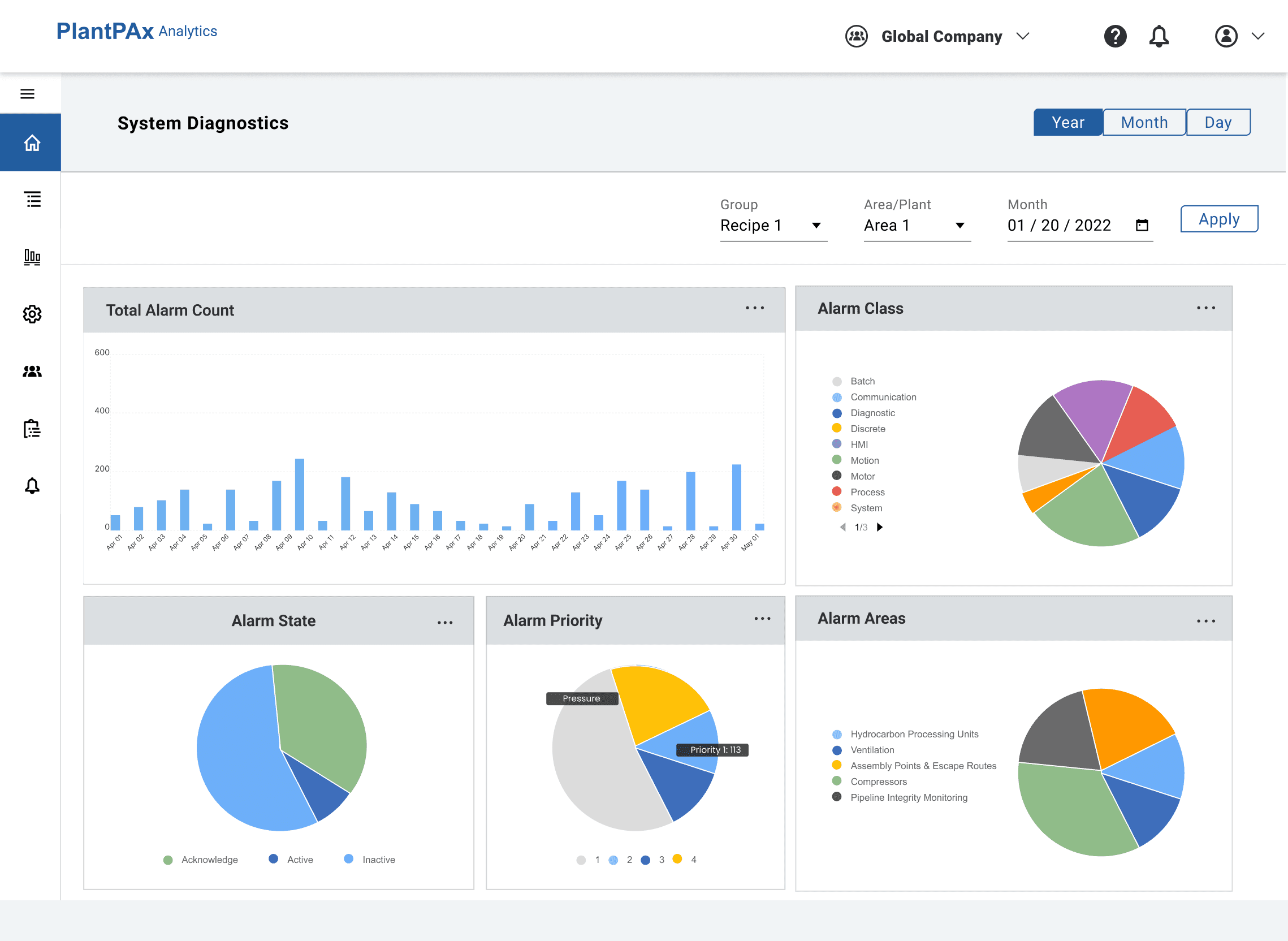
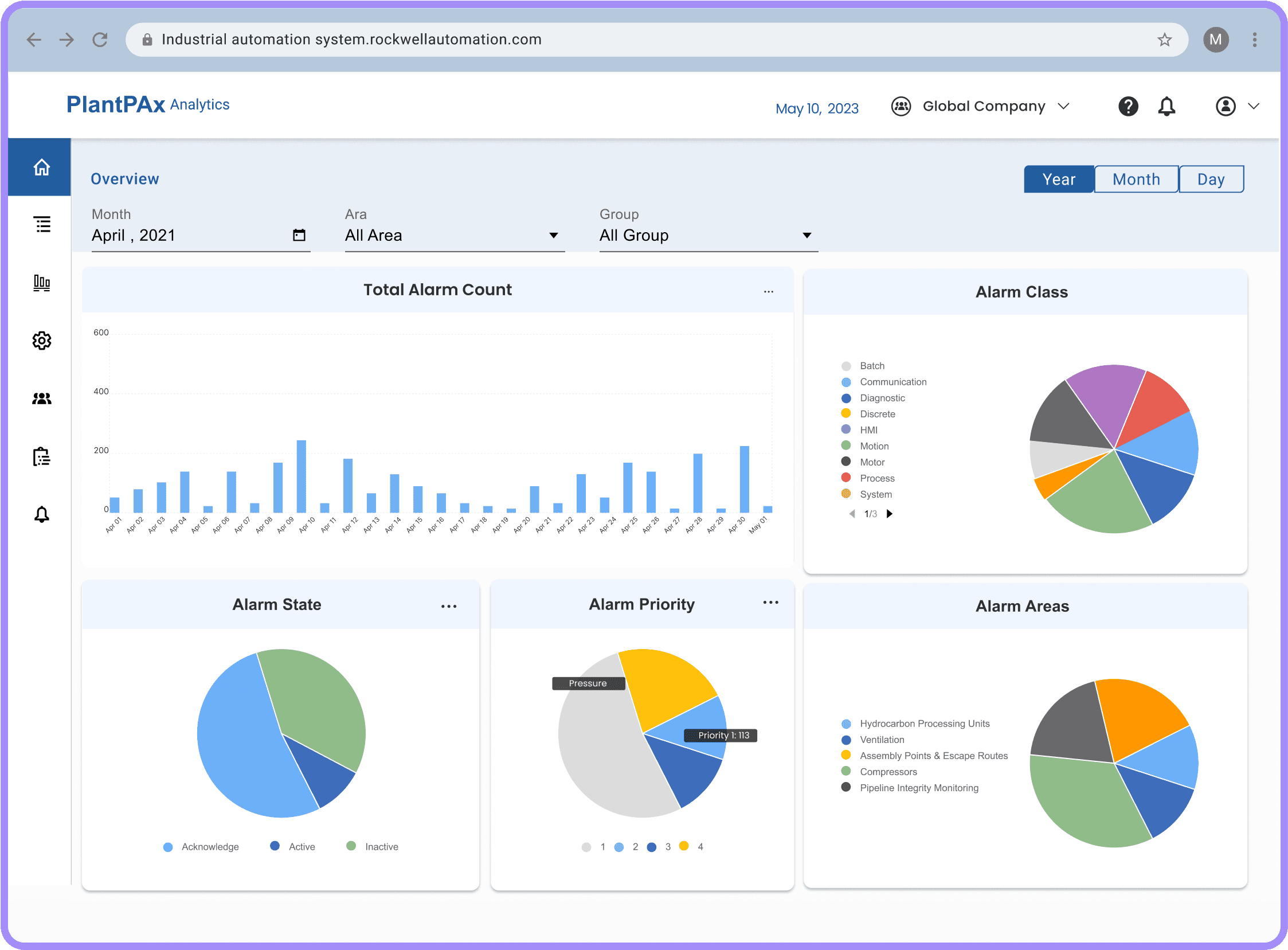
The home page now features an Enterprise-Level Alarms Overview, displaying all sites with total alarms, alarm trends, and distribution at a glance. Clicking "View More" directs users to the System Diagnostics page for detailed analysis. This provides immediate access to alarm information directly from the home page.
Final Deliverables
After
Before
After
Before
After
Before
After
Before
After
Before
After
Before
After
Before
After
Before
After
Before
After
Before
The side navigation now has an expandable "System Diagnostics" menu, which includes detailed "System Health" and "Alarms and Events" options. This allows users to directly access comprehensive diagnostics and view alarms and events in detail for each piece of equipment at the enterprise level.
A fixed "Active Alarms" card offers immediate visibility into critical issues. Adjacent to it are scrollable cards focusing on system diagnostics, displaying important information such as site capacity, downtime, and more. This arrangement allows users to quickly assess key performance indicators and efficiently monitor system health, all within a streamlined interface.
The overview page now features horizontal accordions that provide detailed system health information without requiring navigation to different pages. This design allows users to expand sections for in-depth insights while keeping the interface clean and accessible.
The home page now features an Enterprise-Level Alarms Overview, displaying all sites with total alarms, alarm trends, and distribution at a glance. Clicking "View More" directs users to the System Diagnostics page for detailed analysis. This provides immediate access to alarm information directly from the home page.
Design
Design
Lessons and More
Lessons and More


UX design goes beyond Design Tools
UX design goes beyond Design Tools
UX design goes beyond Design Tools
It's not just about creating interfaces; understanding technical feasibility and industry-specific needs is essential.
It's not just about creating interfaces; understanding technical feasibility and industry-specific needs is essential.

Good Collaboration is Crucial
Good Collaboration is Crucial
Good Collaboration is Crucial
Working closely with stakeholders and technical teams ensures that designs meet both user needs and business goals.
Working closely with stakeholders and technical teams ensures that designs meet both user needs and business goals.
Checkout My Other Projects
Batch Performance Analysis
Batch Performance Analysis
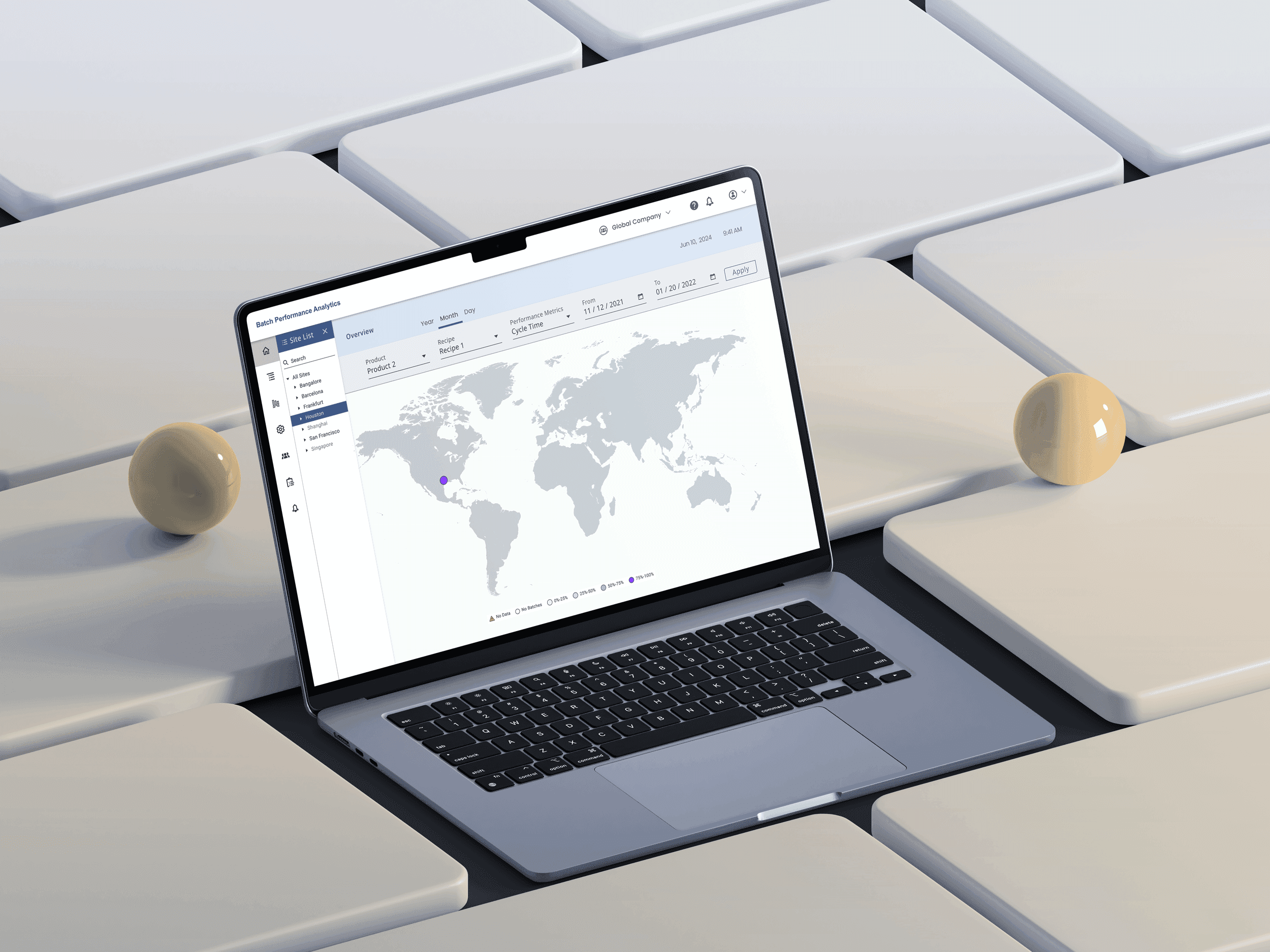
This project focuses on analyzing and improving production efficiency through data-driven insights.
This project focuses on analyzing and improving production efficiency through data-driven insights.
Checkout My Other Projects
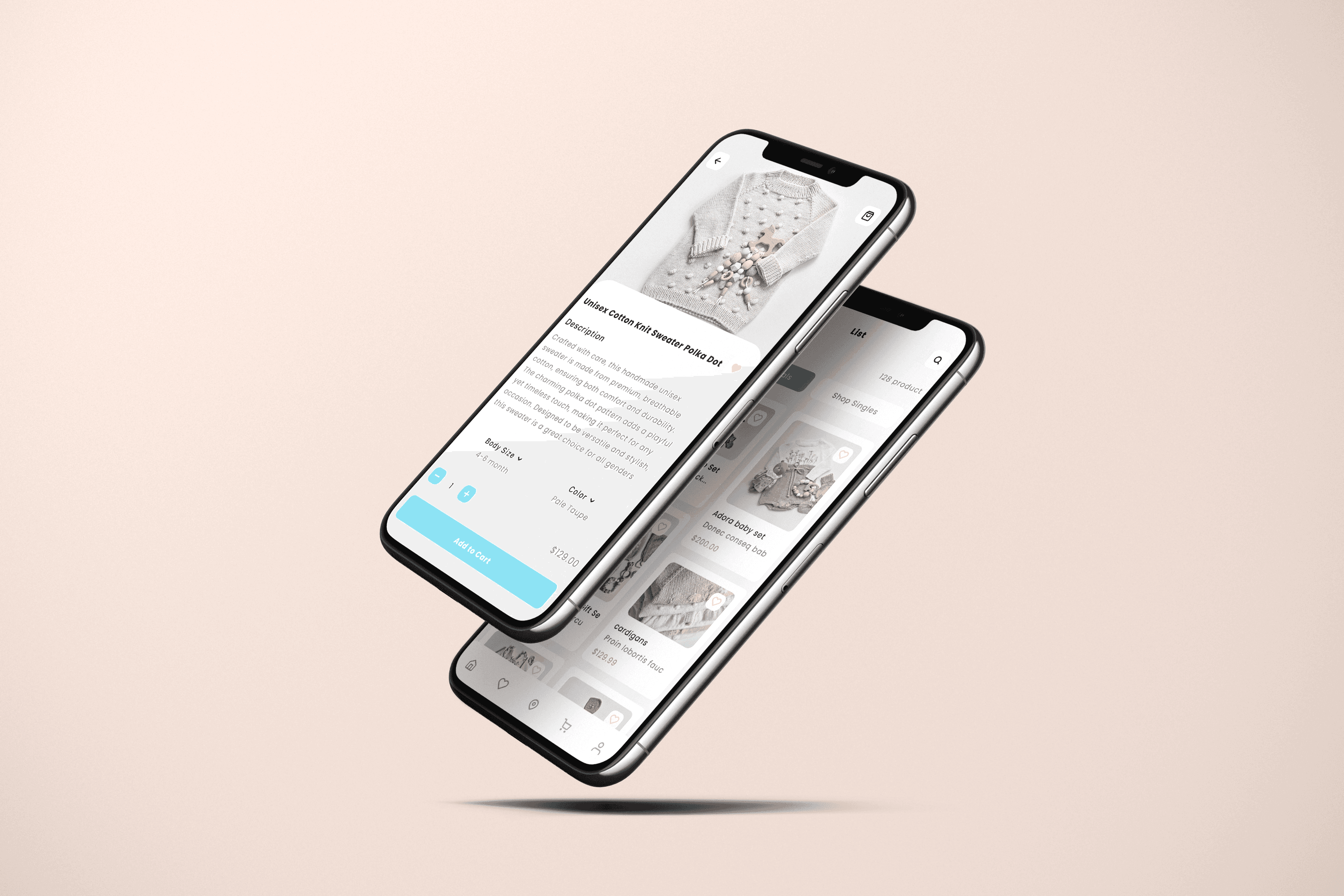
ReBabies eCommerce platform
ReBabies eCommerce platform
ReBabies is an eco-conscious eCommerce store specializing in handmade knitwear for babies and toddlers.